Free program for automating your key strokes and mouse clicks

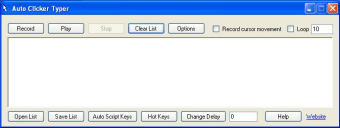
Auto Clicker Typer is a tool that allows you to program a series of repetitive clicks and button strikes. Despite the fact the app is very simple, the record function and the auto-script function gives you a lot more control than it may firstly appear.

Type and click to have your actions repeated

Auto Clicker Typer allows you to program a series of clicking and typing actions. One of the easiest ways to program it is to let it record what you are doing. It will then repeat your mouse moves, clicks and button strikes over and over again as you demand. This is a great auto-clicker, but it has the same problem as many others in that any success is hit or miss. For example, it may allow you to record your clicks on a DRM-free GOG.com game, but will only recreate clicks on your Steam library interface and not within in the games themselves. Figuring out how to get it to work with each platform, app and operating system usually takes more work than many are willing to put in.

A great tool if you can get it working

Auto Clicker Typer is a nice convenience tool for people who frequently use the same programs on their computer day after day. If you can get it working, then it is a nice time saver that also doubles over as a brilliant way to cheat at games. Many games demand that you grind your way to winning, and tools like the Auto Clicker Typer are great for exploiting games where repetitive moves are required for grinding. Since this tool is technically keylogging software, your virus scanner or Internet service provider may flag it as a virus. It is up to you if you wish to proceed after the warning.


  • Pros

    • Saves time and hassle with repetitive tasks
    • The auto script function offers lots of customization options
    • Small in size and requires no Internet connection
    • Can be operated without knowledge of programming
  • Cons

    • Getting it working with all your desktop programs is tricky
    • The interface is very basic with little styling
    • They should highlight how to stop the record without clicking
    • Some virus scanners mistake it for automated malware
 0/1

App specs

  • License

    Free

  • Version

    1.0

  • Latest update

  • Platform

    Windows

  • OS

    Windows 8.1

  • Language

    English

    Available languages

    • German
    • English
    • Spanish
    • French
    • Italian
    • Japanese
    • Dutch
    • Polish
    • Portuguese
  • Downloads

    39.6K

    Last month's downloads

    • 867
  • Size

    626.26 KB

  • Developer

Program available in other languages


User reviews about Auto Clicker Typer

Have you tried Auto Clicker Typer? Be the first to leave your opinion!

Add review

You may also like

Alternatives to Auto Clicker Typer

Explore Apps

Latest articles

Laws concerning the use of this software vary from country to country. We do not encourage or condone the use of this program if it is in violation of these laws.
Softonic

Is Auto Clicker Typer safe?

Score result: Warning

This file has been flagged as potentially harmful or containing unwanted bundled software. Please proceed with caution.

  • Virus free
  • Spyware free
  • Malware free
  • Verified by Security Partners

    VirusTotal logo

Scan Info

Last scan
Wednesday, December 2, 2020
Scan provider
VirusTotal

Softonic security notice

This software has been thoroughly scanned by our advanced security systems and verified by industry-leading partners. However, one or more antivirus engines have flagged this software with potential risks. While these detections may be false positives, we recommend caution when downloading and installing. Some programs may include unwanted software or behaviors that could affect your device. False positives can occur when safe software is mistakenly flagged as harmful due to overly cautious detection rules or algorithms in antivirus tools. This means the program may still be safe to use, but we advise reviewing the details before proceeding.